How to Capture WhatsApp Leads Automatically from Your Website (2026 Step-by-Step SOP)
How to capture WhatsApp leads automatically from your website: a WhatsApp button that carries context, an instant reply, every lead saved to a sheet or CRM, and a person alerted to take over.
To capture WhatsApp leads automatically, add a WhatsApp button with a pre-filled message to each key page, connect your website form to an automation tool, send an instant reply, save every lead in a sheet or CRM, and alert a person to take over. Only message people who have agreed to hear from you on WhatsApp.
Below is the three-step setup we use for clinics and real estate businesses in Vizag, plus the mistakes that quietly leak leads.
Why do website leads go cold on WhatsApp?
Leads go cold when nobody replies in time. A visitor taps "WhatsApp us" late in the evening, the office is closed, and by morning they have messaged another clinic or project. The problem is rarely the button itself. It is that nobody owns the reply, the follow-up, or the record of who asked what.
This is how the leak usually happens:
- A potential patient or buyer finds your website at night.
- They tap a plain WhatsApp button that opens with just "Hi".
- Nobody sees the chat until the next morning.
- By then they may have contacted someone else, and your team does not know what they wanted.
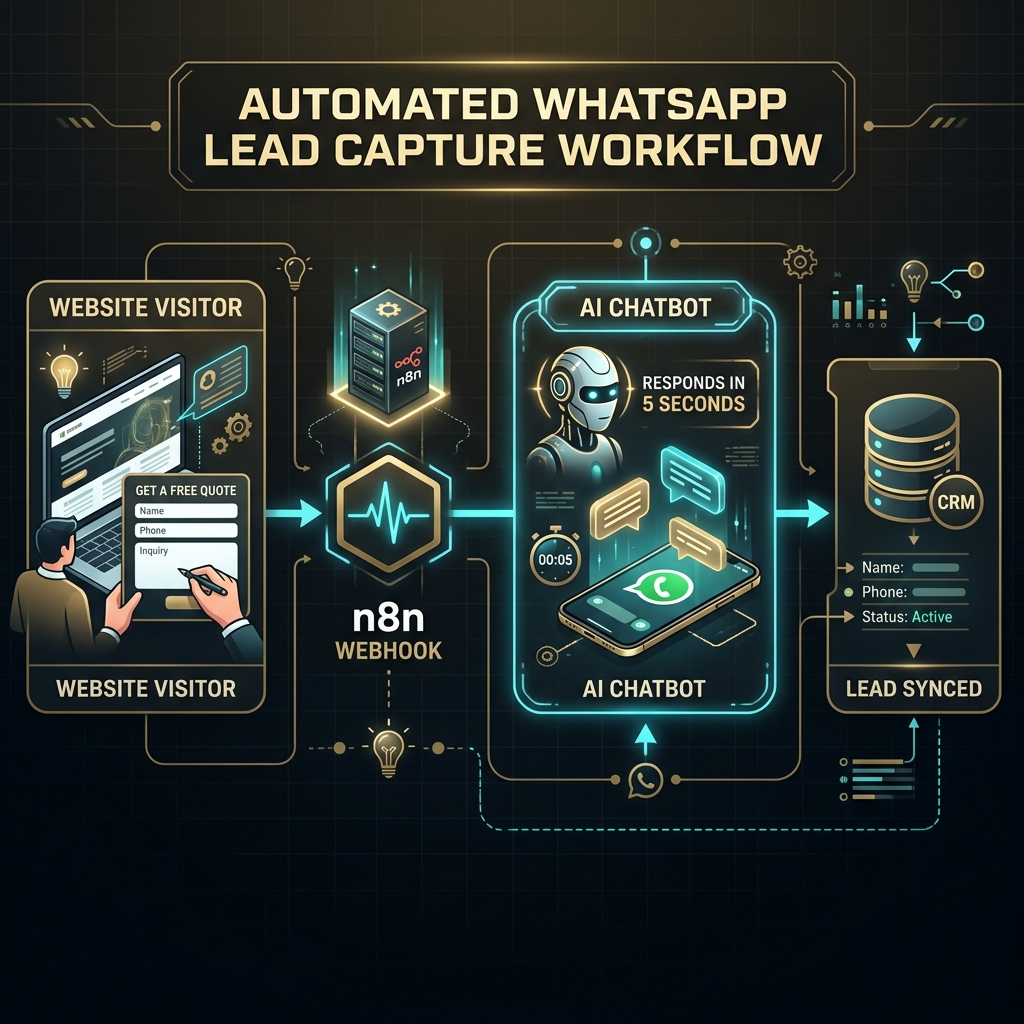
What does an automatic WhatsApp lead capture system look like?
It has three layers: a trigger on your website that starts the chat with context, an automatic reply that asks a few simple questions, and a record that saves each lead and alerts your team. You do not need expensive enterprise software for this. The table compares a manual setup with an automated one.
| Part | Manual setup | Automated setup |
|---|---|---|
| Trigger | Plain wa.me link that opens with "Hi" | Pre-filled message that says which page or service the visitor came from |
| First reply | When someone at the office sees the chat | Instant automatic reply, day or night |
| Questions | Staff ask by hand, if they remember | A chatbot asks name, need and a good time to talk |
| Record | Phone chat history or a notebook | Saved to Google Sheets or your CRM automatically |
| Handover | Whoever picks up the phone | A named person gets an alert and takes over |
Step 1: How do you add context to your WhatsApp button?
Use a WhatsApp click-to-chat link with a pre-filled message on each page, so the chat opens with text like "Hi, I want to book a dental check-up" instead of just "Hi". Your team or your chatbot then knows what the person wants before replying. WhatsApp explains this format in its click to chat help page.
The link looks like `https://wa.me/91XXXXXXXXXX?text=Hi%2C%20I%20want%20to%20book%20a%20check-up`: your full number in international format (no plus sign, spaces or dashes), then the message with spaces written as %20. Some examples of the message for different pages:
- Dental clinic, check-up page: "Hi, I want to book a dental check-up."
- Clinic, timings page: "Hi, I want to know your clinic timings."
- Builder, project page: "Hi, I want the floor plan for this project."
- Broker, rentals page: "Hi, I am looking for a flat to rent."
One link per page takes a few minutes to set up and removes the "Hi, what is this about?" back-and-forth.
Step 2: How do you connect your website form to WhatsApp?
Send each form entry to an automation tool such as n8n or Make, which then sends an approved WhatsApp template message through the WhatsApp Business Platform. Templates matter because, under WhatsApp's business messaging policy, a business can only start a conversation with an approved template and can reply freely only within 24 hours of the customer's last message.
Here is the flow:
- Form submit: the visitor enters their name and phone number on your site and ticks a box agreeing to WhatsApp messages.
- Webhook: the automation tool picks up the entry the moment it arrives.
- Template reply: WhatsApp sends an approved message, for example: "Hi [Name], thanks for your enquiry about [service]. When is a good time for us to call?"
- Quick-reply buttons: offer simple choices such as *Book a visit*, *Ask a question* or *Talk to a person*.
Meta's guide on getting opt-in for WhatsApp explains how to word the consent line on your form.
Want us to map this flow for your clinic or project? WhatsApp Vyzma or book a free call.
Step 3: What should a WhatsApp chatbot ask a new lead?
Keep it to three or four questions: name, what they need, where they are, and a good time to talk. A chatbot can answer simple questions such as timings, location and how to book, then hand anything about treatment, price or a specific flat to a person. Short chats are easier for people to finish.
- For a clinic: name, which treatment or concern, preferred day and time, and whether they are a new or returning patient.
- For a builder or broker: name, which project or area, budget range in their own words, and whether they want a site visit.
- Language: many Vizag customers mix Telugu and English, so write the replies in the language your enquiries actually arrive in.
- Handover: WhatsApp's policy says automated chats must offer a clear way to reach a person, such as a human agent, phone number or email.
For clinics, keep medical details out of the chatbot. Reports and symptoms belong with the doctor, not in an automated chat. Our AI chatbots service builds this kind of WhatsApp and website chatbot with a human handover.
How do you make sure no lead is missed after capture?
Save every lead in one place, give each lead an owner, and follow up on a fixed schedule until they reply or say stop. Capture is only the first step. An alert to a named person and a short follow-up plan are what turn a WhatsApp chat into a booking or a site visit.
- One list: every lead goes to the same sheet or CRM, with the page they came from and the date they agreed to messages.
- One owner: a named person gets an alert when a new lead arrives or replies.
- A follow-up plan: we explain what to send and when in WhatsApp lead follow up for clinics and builders.
- Consent records: India's Digital Personal Data Protection Act, 2023 requires consent to use personal data. See what that means for your lead list in what a DPDP-compliant CRM is.
If you also want calls answered when the front desk is busy, read what an AI receptionist does for clinics. Our workflow automation service connects the form, WhatsApp, your sheet or CRM and the alerts.
What mistakes stop WhatsApp lead capture from working?
Most setups fail for simple reasons: messaging people who never agreed, a plain "Hi" link with no context, a chatbot that cannot hand over to a person, and leads that live only on one staff phone. Fix these four before adding anything fancier, and test the whole flow yourself once a week.
- No consent: you cannot show when and how the person agreed to WhatsApp messages.
- No context: every chat starts with "Hi" and your team has to ask what it is about.
- No way out of the bot: the chatbot keeps answering when the person wants a human.
- No shared record: leads sit in one phone, so nobody else can follow up.
- No testing: nobody has filled the form themselves since the day it went live.
Not sure where your site leaks leads? Try our free website audit. For an example of our work, see the NIFS India case study.
Ready to capture every WhatsApp lead?
If enquiries reach your website but bookings and site visits do not follow, the gap is usually the first reply and the follow-up. We can look at your current WhatsApp flow and show you where leads drop off. WhatsApp Vyzma or book a free call to talk about your clinic or project in Vizag.
Explore Related Solutions & Cities
Frequently Asked Questions
Q: Can I capture WhatsApp leads automatically without coding?
A: Yes, mostly. Tools such as n8n or Make connect your website form to WhatsApp with little or no code. Setting up the WhatsApp Business Platform and approved message templates usually needs a one-time technical setup.
Q: Do I need the WhatsApp Business API to automate lead replies?
A: For automatic replies to website form leads, yes: you need the WhatsApp Business Platform (the API). The free WhatsApp Business app is built for chats you answer by hand on a phone.
Q: Can I send a WhatsApp message to someone who filled my website form?
A: Only if they agreed to get WhatsApp messages from you. To start the conversation you must use an approved message template, and you can reply freely only within 24 hours of their last message, as set out in the WhatsApp Business Messaging Policy.
Q: What details should a WhatsApp chatbot collect from a new lead?
A: Keep it short: name, what they need, where they are and a good time to talk. For clinics, leave symptoms and reports to the doctor. Then alert a named person to take over.
Q: Is automatic WhatsApp lead capture allowed under India's DPDP Act?
A: It can be, if you collect only what you need, record the person's consent, use the data for the stated purpose and stop messaging when they ask. The Digital Personal Data Protection Act, 2023 is published on meity.gov.in.
More Articles from Vyzma AI
AI Receptionist for Clinics in India: What It Does and What It Must Never Do
WhatsApp Lead Follow Up for Clinics and Builders in India: What to Send and When
DPDP-Compliant Real Estate CRM: What It Actually Means (Not TRAI-Compliant WhatsApp)
Want AI Growth Systems for Your Business?
Talk to us on WhatsApp about AI chatbots, fast websites and search visibility for your business.
Chat with Vyzma AI on WhatsApp →